Build one exact event contract, then carry it through Blueprint, C++, scheduled delivery, retention, secure transport, Flow orchestration, and correlated diagnostics.
Rekall Global Events lets one gameplay system announce that something happened without needing direct references to every system that may react. Each event has a stable name and an exact data shape. Interested systems listen for that event, and the plugin validates, routes, schedules, retains, transports, or traces it according to explicit rules.
01Define
Create Game.Inventory.ItemAdded with an Item Id and Quantity payload.
02Listen
Let UI, quests, audio, and analytics subscribe independently.
03Publish
Announce the event once when inventory accepts the item.
04React
Each eligible listener receives the same validated contract.
Define → Listen → Publish → React
Why use it
One fact, several reactions
The inventory component does not need references to the quest tracker, HUD, audio system, or analytics code. Those systems can be added or removed without changing the publisher.
Exact contract
Errors stay visible
The Gameplay Tag identifies the event, the reflected struct fixes its data shape, and a structured result reports what the publication actually did.
Optional extensions
Grow one contract
Core handles local delivery. Network, Flow, and Insights extend selected contracts without changing what the original event means.
02
Start here
The complete event lifecycle
What it is
Publishing is a checked journey from a stable event identity to a specific delivery outcome. It is not a blind broadcast.
Why use it
Each stage has one responsibility, so failures stay specific: a bad definition is different from a payload mismatch, an invalid selector, a full queue, or simply having no listeners.
Simple example
Inventory publishes Game.Inventory.ItemAdded with Item Id = HealthPotion and Quantity = 2. The quest, UI, audio, and analytics listeners can react without being dependencies of inventory.
How it works
01Resolve
The definition registry resolves the Game.Inventory.ItemAdded Gameplay Tag.
02Validate
The publication must carry the definition's exact reflected payload struct.
03Plan
Scope, audience, timing, and priority options resolve independently.
04Admit
Publication delivers now or is admitted to a bounded queue for later delivery.
05Deliver
An eligible subscription snapshot receives the payload and immutable context.
06Report
The result says delivered, queued, no subscribers, or names a specific rejection.
Technical details
Immediate delivery snapshots eligible subscriptions before invoking them, so a callback can safely unbind without mutating the active iteration. Queued acceptance means work entered the bounded scheduler; it does not mean callbacks already ran. The context is read-only and carries resolved routing, sequence, and correlation information.
03
Start here
Install the plugin
Install once for a project or engine, enable the plugin, and add a native module dependency only when your own C++ code uses the API.
Close Unreal Editor.
For one project, copy the plugin to <Project>/Plugins/RekallGlobalEvents. For every project in one UE 5.8 installation, use <UE_5.8>/Engine/Plugins/Marketplace/RekallGlobalEvents.
Enable and restart.
Open Edit > Plugins, search for Rekall Global Events, enable it, and restart when prompted. A Blueprint-only project needs no generated Visual Studio files and no module dependency.
Rebuild native projects.
If the project has C++, regenerate project files and rebuild its Editor target. Add RekallEventsCore to the consuming module; add Network or Flow only where native code uses those optional runtimes.
This complete local workflow requires no C++ and leaves you with a saved payload schema, validated definition, live listener, and inspectable publication result.
Create and save the payload.
In the Content Browser choose Add > Blueprint > Structure. Name the Blueprint Struct ST_InventoryItemAdded, add Item Id (Name) and Quantity (Integer), then save it before assigning it to a definition.
Create the identity.
In Gameplay Tags settings add Game.Inventory.ItemAdded. Rekall uses the Gameplay Tag as the stable runtime identity; the asset name and display name are not the identity.
Create and validate the definition.
Choose Add > Data > Data Asset, select Rekall Event Definition, and set the tag, saved payload struct, display name, World scope, Immediate delivery, and schema version 1. Run Asset Actions > Validate Assets and fix every error.
Compile a catalog.
Create another Data Asset, select Rekall Event Catalog, and add the definition under Definition Assets. Assign that catalog as Default Catalog in Project Settings > Game > Rekall Events. Each Game Instance compiles the complete catalog atomically; one invalid record leaves the registry unhealthy instead of partially registered.
Bind with the right lifetime.
In an Actor Blueprint place Bind Inventory Item Added at Begin Play. Leaving World Context and Owner disconnected uses self. Read the exact ST_InventoryItemAdded payload on On Event. Store the subscription handle only if you must unbind early; owner destruction removes the listener safely.
Publish and inspect.
In another Blueprint place Publish Inventory Item Added, construct the exact typed payload, and execute it. Inspect Result.Status, attempted/delivered/skipped counts, diagnostic code, sequence, and correlation ID—or branch with Is Publish Successful—before assuming a listener ran.
05
Start here
Publish your first C++ event
Define one reflected payload and stable Gameplay Tag, register their exact pairing before Game Instance initialization, then resolve, subscribe, publish, inspect, and clean up through the public typed API.
Add the runtime modules.
Add Core and Gameplay Tags privately to the consuming game module. Use public dependencies only if your public headers expose their types.
A native definition provider is an Unreal modular feature. Register it in module startup so each subsequently initialized Game Instance snapshots it, and unregister it before the provider is destroyed. Duplicate tags or a missing payload type make registry initialization fail atomically.
#include "Definitions/IRekallNativeDefinitionProvider.h"
#include "Features/IModularFeatures.h"
#include "InventoryEvents.h"
#include "Modules/ModuleManager.h"

UE_DEFINE_GAMEPLAY_TAG_COMMENT(
    TAG_Game_Inventory_ItemAdded,
    "Game.Inventory.ItemAdded",
    "A local inventory item was added.");

class FMyGameModule final
    : public IModuleInterface
    , public IRekallNativeDefinitionProvider
{
public:
    virtual void StartupModule() override
    {
        IModularFeatures::Get().RegisterModularFeature(
            IRekallNativeDefinitionProvider::GetModularFeatureName(), this);
    }

    virtual void ShutdownModule() override
    {
        IModularFeatures::Get().UnregisterModularFeature(
            IRekallNativeDefinitionProvider::GetModularFeatureName(), this);
    }

    virtual void AppendDefinitions(
        TArray<FRekallEventDefinitionRecord>& OutRecords) const override
    {
        FRekallEventDefinitionRecord& Record = OutRecords.AddDefaulted_GetRef();
        Record.EventTag = TAG_Game_Inventory_ItemAdded;
        Record.PayloadStruct = FInventoryItemAdded::StaticStruct();
    }
};

IMPLEMENT_PRIMARY_GAME_MODULE(FMyGameModule, MyGame, "MyGame");
Resolve, subscribe, and publish.
Declare FRekallScopedSubscription ItemAddedSubscription; as a native member of the listening object. Resolve against an explicit World Context Object, retain the move-only subscription for exactly the listener lifetime, and inspect the structured publish result.
This is a starting guide, not a ranking. Choose the mechanism whose ownership, timing, authority, and lifetime match the problem.
Why use it
Event-driven code is useful for independent reactions, but adding indirection where a dependency is intentional makes gameplay harder to follow.
Simple example
Keep the authoritative inventory count as a replicated property. After inventory accepts a pickup, use Game.Inventory.ItemAdded for independent local reactions. A tutorial Flow may wait for that event, while an AI's ongoing decisions remain in StateTree or Behavior Tree.
How it works
Start with
Realistic example
Boundary
Direct call
A pickup tells its known inventory component to add an item and needs the result now.
The caller intentionally owns the dependency; it is not an independent announcement.
Delegate or interface
A weapon exposes an ammo-changed callback to its owning HUD, or interacts with a known usable object.
Best when ownership and observer set are local and already clear; it does not provide a global definition registry.
Replicated property or RPC
The server replicates authoritative inventory quantities and ownership to clients.
Use Unreal replication for gameplay truth; an event notification does not replace correction, relevancy, dormancy, or state recovery.
Gameplay Message Subsystem
A project already standardized on Gameplay Tags sends lightweight local gameplay messages to tag listeners.
Stay with its message model when Rekall's exact definitions, structured results, bounded retention, transport policy, Flow, or Insights are not needed.
Rekall Core
Inventory publishes Game.Inventory.ItemAdded so UI, quests, audio, and analytics react independently.
Core is local event delivery. It is not network replication, a transaction coordinator, or authoritative state storage.
Rekall Network
The server transports an allowlisted presentation or workflow event to an owning client.
Only explicit policies cross authority through admitted endpoints; authoritative inventory remains Unreal replicated state.
Rekall Flow
A data-authored tutorial starts, waits for the key pickup, branches, opens a door, and ends.
Use it for bounded multi-step orchestration, not continuous AI decision-making or general Blueprint replacement.
StateTree or Behavior Tree
An enemy continuously evaluates perception, combat state, and movement decisions.
These model long-lived state and decisions; they can publish or wait for events without being replaced by them.
Technical details
Ask four questions before choosing: who owns the dependency, whether a return value is required synchronously, whether authority or state recovery matters, and whether the behavior is a one-time announcement or a long-lived decision process. Then add optional Rekall capabilities only where their explicit contracts solve a real need.
07
Foundations
Three ideas before the node atlas
Start with the contract, then learn who announces and reacts, then choose the authoring surface. Everything else in Core adds delivery rules to those three ideas.
Choose concrete pins at authoring time or an owning runtime-selected value.
07A
Foundations
Definitions, Gameplay Tags, and payloads
What it is
An event definition is a saved contract: one stable Gameplay Tag, one exact reflected payload struct, and policy metadata such as default delivery, retention, tracing, and optional transport rules.
Why use it
The definition gives publishers and listeners one shared meaning. Validation can reject the wrong data shape before an eligible listener sees it.
Simple example
Game.Inventory.ItemAdded is the identity. Its payload is either the saved Blueprint Struct ST_InventoryItemAdded or the registered native USTRUCTFInventoryItemAdded, with Item Id and Quantity fields.
How it works
A Game Instance compiles catalog assets and native definition providers into one atomic registry snapshot keyed by Gameplay Tag. Publication resolves that registry entry; it does not scan assets by name. The asset may be renamed or moved without changing runtime identity as long as the Gameplay Tag remains the same.
Technical details
Schema matching uses exact UScriptStruct identity, not a comparison of field layout. A base struct, derived struct, or unrelated layout-compatible struct is still a PayloadMismatch. Use FRekallEmptyPayload for a native signal with no fields rather than leaving the contract unset. Duplicate tags or missing payload types make registry initialization fail atomically.
07B
Foundations
Publishing and listening
What it is
A publisher is an announcer. A subscription is one independent promise to react when a matching event reaches its routing domain.
Why use it
Inventory can announce one accepted pickup while UI, quest progress, audio, and analytics each own their reaction. No listener has to be present for the publisher to remain valid.
Simple example
The inventory component publishes Game.Inventory.ItemAdded once. A quest subscription reads Quantity; the HUD subscription refreshes its count; removing the audio listener does not require an inventory code change.
How it works
Binding records a weak owner and returns a subscription handle. Keep the handle when you need to unbind early; otherwise owner destruction removes the listener safely. Immediate publication invokes the eligible subscription snapshot inside the publish call. Queued publication reports successful acceptance into bounded work and invokes callbacks only when its chosen tick or phase arrives.
Technical details
FRekallPublishResult classifies Delivered, Queued, Transported, and No Subscribers as successful publication outcomes. Invalid Definition, Payload Mismatch, Invalid Context, Invalid Scope, Rejected By Policy, and Network Handoff Failed are failures. No Subscribers means the contract was valid but no eligible listener matched; it is not automatically an error. Preserve the stable diagnostic code and correlation ID when escalating a problem.
07C
Foundations
Typed versus generic authoring
What it is
Typed and generic nodes use the same registered contract. They differ in when the event identity becomes known and where schema checking appears.
Why use it
Typed nodes make a known definition easy to read in a Blueprint graph. Generic nodes let reusable systems select among definitions at runtime without borrowing payload memory.
Simple example
A typed Publish Inventory Item Added node exposes a concrete ST_InventoryItemAdded pin. A generic Publish Event call carries the runtime-selected Game.Inventory.ItemAdded tag plus an owning FInstancedStruct containing that same exact payload type.
How it works
Choose
Best fit
Schema feedback
Inventory example
Choose typed when
The definition is known while authoring the graph or C++ call site.
Definition-backed concrete pins reconstruct when the payload changes; incompatible links disconnect visibly.
A reusable, data-driven tool selects a Gameplay Tag at runtime.
The owning FInstancedStruct is validated against the resolved definition at publication.
A diagnostic relay inspects several inventory tags selected from data.
Technical details
Typed editor K2 nodes compile away to Core or Network runtime calls; packaged bytecode does not require their editor classes. Generic payloads own their reflected value in FInstancedStruct; they are not untyped byte blobs, and exact struct identity is still required.
08
Foundations
C++ API and listener lifetime
TRekallEvent<TPayload> resolves a Gameplay Tag once against one Game Instance registry generation, then enforces the reflected payload type for publish and subscribe calls.
The first argument is the explicit World Context Object; sender is optional and recorded weakly. Cache a typed handle only for the current Game Instance registry lifetime. World mismatch, registry replacement, travel to a replacement Game Instance, or teardown makes it stale.
FRekallScopedSubscription is move-only and owns one cleanup responsibility. Reset/destruction unsubscribes through a weak public endpoint, while URekallEventListenerComponent can collect Actor-owned handles and clear them at End Play. A wrapper's IsValid() is syntax/ownership state, not a live-router query.
09
Delivery
Scope, audience, timing, and priority
What it is
Every local publication answers four separate questions: where it belongs, which listeners qualify, when callbacks run, and how eligible work is ordered.
Why use it
Separating these decisions prevents a timing change from silently broadening the audience, or a high priority from becoming an accidental phase override.
Simple example
Publish Game.Inventory.ItemAdded in the current World, qualify the intended local listeners, choose End Frame so inventory mutation settles before UI and quest reactions, and use normal priority unless ordering among that phase's eligible work matters.
How it works
01Scope
Choose which local routing domain owns delivery: World, Game Instance, or a narrower local context.
02Audience
Choose which subscriptions qualify through a directed target or captured Gameplay Tag Query.
03Timing
Run now, on the next tick, or at Pre Physics, Post Physics, or End Frame.
04Priority
Order eligible callbacks or queued work; never jump ahead of the selected phase.
Resolved delivery choices and selectors
Choice
Lifetime or timing
Required selector
World
One game World; removed at travel/teardown
None
Game Instance
Persists across ordinary World travel
None
Local Player
One local split-screen player
Explicit/derivable ULocalPlayer
Directed
One exact weak UObject owner
Directed target
Audience
Listeners whose captured tags satisfy a query
Non-empty Gameplay Tag Query
Immediate
Dispatches during Publish
No phase
Next Tick
Queues for the next game-thread tick
No phase
Tick Phase
Queues for Pre Physics, Post Physics, or End Frame
Tick phase
Immediate
Runs eligible callbacks inside the publish call. Use when the producer can safely pay callback cost and reentrant reactions are expected.
Next Tick
Accepts work into a bounded queue for the next game-thread tick. Use to break reentrancy or let current state settle.
Tick Phase
Queues for Pre Physics, Post Physics, or End Frame. Use when reaction order relative to simulation is part of the contract.
Definition defaults versus publication overrides
Definition field
Publication control
Resolution rule
Scope
bOverrideScope + Scope
The definition wins unless the flag is true.
Delivery mode
bOverrideDeliveryMode + Delivery Mode
The flag makes even an explicit Immediate override unambiguous.
Tick phase
bOverrideTickPhase + Tick Phase
Used when effective delivery is Tick Phase.
Priority
bOverridePriority + Priority
Higher priority sorts first with stable ordering.
Definition defaults make consistent delivery the zero-configuration path. Leave flags false to honor a definition's World / Next Tick defaults. To force one call inline, set bOverrideDeliveryMode and choose Immediate; changing the value without its flag does nothing.
Technical details
Immediate delivery can be reentrant: a listener runs before Publish returns and may cause more gameplay work. Next Tick and Tick Phase break that call stack but remain bounded admission, so inspect a rejected result. Explicit subscription tags and IRekallAudienceProvider tags are merged and captured when binding; after team, role, or membership changes, unbind and subscribe again. Scope and audience are local selectors, not replication, and mixed or missing selectors return InvalidScope rather than broadening delivery.
10
Delivery
Retention and explicit replay
What it is
Retention is a bounded local cache of accepted event envelopes. Depending on policy, one retention key can keep one newest snapshot or a short recent sequence. It is not an event log, database, durable save, or replicated state store.
Why use it
A late-created local UI can explicitly ask for the newest relevant presentation snapshot instead of requiring the original publisher to fire again.
Simple example
If Game.Inventory.ItemAdded uses Latest, a late UI listener may query or replay the most recent pickup. That snapshot says what was added last; it cannot reconstruct the full authoritative inventory. A compact inventory-summary definition is usually the better retained contract for a full UI refresh.
How it works
None
Deliver and forget. Choose it for transient effects, audio cues, damage flashes, analytics markers, and any notification a late listener should not reconstruct.
Latest
Keep the newest accepted envelope for its resolved local scope key. Choose it for one compact current snapshot such as match phase or presentation mode.
RecentHistory
RecentHistory keeps multiple accepted envelopes for one retention key in sequence order. Query and replay still select only the newest matching sequence; they do not stream the older snapshots. Per-key and global entry/byte limits evict the oldest sequence first, and expiry removes aged snapshots. Choose it over Latest only when a short, bounded local presentation or workflow trail matters. It is not an event log, durable history, or replicated state.
Latest per Audience
Keep the newest value per exact audience-query identity. Choose it only when each local audience stream needs an independently bounded snapshot.
Technical details
Retention keys include event tag, resolved scope, Local Player or Directed scope object where required, and the exact Audience query where required. Expiry, maximum entries, and maximum bytes are always enforced. A queued publication is not retained until it reaches its delivery phase. Query returns a snapshot; replay delivers that snapshot to a chosen live handle through the local router and does not republish it globally.
11
Optional systems
Move a local event to the network
Keep the existing Gameplay Tag and exact payload schema. Network transport extends the same definition with an explicit allowlist and an owned endpoint; it does not create a second event identity or a global replicated catch-all.
Add the transport policy.
Add one Rekall Network Policy Fragment to the existing definition. Choose the narrowest direction, set Reliable or Unreliable intentionally, and configure positive payload-byte and per-connection rate limits. Without this fragment, the definition remains local-only.
Decide whether clients may originate it.
For Client to Server traffic, enable client origin explicitly. If gameplay ownership, team, inventory, or permission matters, name and register a server-side IRekallNetworkAuthorization rule. A missing named rule fails closed.
Install the owned endpoint.
Add URekallNetworkEndpointComponent to the replicated PlayerController class used by the game. The PlayerController ownership chain makes Client-to-Server RPC admission meaningful; attaching the component to an arbitrary Actor is rejected.
Replace only the crossing publication.
Leave local producers on Publish Event Name. Where transport is required, replace that node with the definition-backed Network Publish Event Name node so the concrete payload pin remains exact. The generic Publish Network Event node is the runtime-selected FInstancedStruct alternative.
Supply route-specific context.
Server to Owner requires Target Owner. Server to Audience requires an explicit server-resolved PlayerController list; duplicates are removed. Parent Correlation Id joins this attempt to the originating Core event or Flow. Never trust sender, authority, or connection identity carried in a client packet.
Validate before PIE.
Run Asset Actions > Validate Assets on the definition and catalog. Confirm one policy fragment, an exact registered payload, a supported schema, positive limits, the intended direction, and any named authorization provider before diagnosing transport.
Exercise the topology in PIE.
First test Standalone and confirm the structured result reports local publication without RPC serialization. Then use multiplayer PIE to test the listen host and a remote client, including the wrong-side rejection path. Finally run the project's dedicated server configuration and confirm endpoint registration, authorization, schema, bounds, recipient count, and Core republication behavior.
12
Optional systems
Secure network transport
What it is
Selected event definitions cross authority boundaries only when an explicit Network policy allows them. Network does not replicate all events, and it does not replace authoritative gameplay state.
Why use it
Use RekallEventsNetwork when a small, declared presentation or workflow notification must reach the server, one owner, an audience, or all connected clients while keeping the same Core event contract.
Simple example
Inventory still changes its authoritative contents through an Unreal replicated property or RPC-owned state change. After the server accepts that change, an allowlisted presentation event can tell a remote tutorial or HUD that Game.Inventory.ItemAdded occurred. The notification may cross the network; inventory truth does not move into the event.
How it works
A definition needs one Rekall Network Policy Fragment, realistic byte and per-connection rate limits, and a supported exact payload schema. Each replicated PlayerController owns a registered URekallNetworkEndpointComponent. For client-origin traffic, the server derives identity from that owning connection and runs any named IRekallNetworkAuthorization rule; a missing named rule fails closed. A client packet never chooses its own sender identity or reflected payload type.
01
Standalone
Validates the live definition and exact payload, bypasses RPC serialization, and publishes through the local World router.
02
Listen Server
The host follows server validation and endpoint rules; owning a local player is not an authorization bypass.
03
Dedicated Server
Runs authoritative definition, policy, schema, rate, byte, recipient, authorization, and late-join decisions without a Local Player.
Admission sequence
Resolve the current game World, Game Instance registry, and registered PlayerController-owned endpoint.
Resolve the live Core definition and its single Network policy fragment.
Plan the route from net mode, caller authority, and declared direction.
Require pointer-exact local payload type, then encode within the positive byte bound and trusted schema signature.
On inbound client traffic, derive identity from the owning connection, consume per-connection/event rate budget, and run any named server authorization rule.
Publish locally on authority or deliver only to the resolved Owner, deduplicated Audience, or All endpoint set; return a structured Network result on every rejection.
Every direction publishes locally in Standalone. In a networked World, the wrong caller side is rejected rather than rerouted. Use reliable transport only where loss changes meaning. Late-join Latest or Recent History is bounded and revalidated for Server-to-All presentation/workflow messages; inventories, health, ownership, and match truth remain Unreal replicated state.
Technical details
The live server definition controls direction, client-origin permission, schema signature, byte and rate admission, authorization, server republication, and recipient resolution. Server-to-Owner requires a target owner; Server-to-Audience uses an explicit, deduplicated server-resolved PlayerController list. Late-join caching is limited to bounded Server-to-All presentation/workflow packets and revalidates the live definition and schema when an endpoint registers.
13
Optional systems
Flow authoring and runtime
What it is
A Flow is a reusable gameplay sequence saved as an asset. It advances through connected steps, may pause while waiting for time or an event, and ends Completed, Cancelled, or Failed.
Why use it
Use a Flow when a tutorial, encounter signal, UI sequence, or other event-driven workflow should remain inspectable as data and should wait for events without turning one Blueprint into a long chain of timers and subscriptions.
Simple example
Start → Publish Tutorial Started → Wait for Key Added → Invoke Condition: Has Key → Action: Open Door → End
01Start
The asset's Entry Node selects the first authored step; the external start call creates this run.
02Publish Tutorial Started
Core validates and delivers the declared tutorial-started event, parented to this Flow's correlation.
03Wait for Key Added
Wait Event listens for Game.Inventory.ItemAdded. It wakes on that tag and discards the delivered payload.
04Invoke Condition: Has Key
Invoke Condition calls the registered Has Key extension and chooses Next Node or False Node from its returned boolean.
05Action: Open Door
A deliberately registered project extension performs the door action. It is not an arbitrary reflected function call.
06End
The successful instance becomes Completed and enters bounded terminal history.
How it works
Saved plan
One reusable authored Flow Asset
The saved asset is the reusable authored plan. It stores indexed node data, an entry index, edges, variables, authority, and budgets.
Live run
One instance and handle
At start, the runtime validates and compiles the saved asset for that instance, then executes against the asset's indexed nodes. The instance has its own owner, current node, variables, status, diagnostics, and correlation ID; its handle controls and inspects only that run.
Build the first Flow
Build the happy path above, then deliberately exercise every way it can stop.
Create and name a Rekall Flow Asset.
In the Content Browser choose Add > Data > Data Asset, select Rekall Flow Asset, and give the asset a purpose-revealing name such as DA_Tutorial_KeyDoor.
Choose the narrowest authority mode.
Use Local, Server Authoritative, Owning Client Cosmetic, or All Clients Cosmetic according to where this exact sequence is allowed to run. Flow state is not implicitly replicated.
Build the entry and connect every path.
Set Entry Node as the diagram's conceptual Start. Add Publish, Wait Event, Invoke Condition, Invoke Action, and End node data; set each Next Node and the Invoke Condition False Node to valid indices. Start is not another internal node kind—the six-node Blueprint lifecycle starts a runtime instance from the asset.
Select the existing event contracts and bound the wait.
Configure Publish with the tutorial-started event tag and exact payload. Configure Wait Event for Game.Inventory.ItemAdded and set a positive delay as its timeout; then connect Invoke Condition: Has Key so both its success and false edges reach intentional bounded outcomes.
Register every named Action or Condition extension.
Implement IRekallFlowExtension, return stable names for Has Key and Open Door, and register the extensions through IModularFeatures. Missing extensions fail closed; Rekall never reflects arbitrary function names.
Set budgets and validate the asset.
Choose positive per-tick and total-step limits plus an intentional lifetime, then run asset validation. Fix invalid entries or edges, unreachable nodes, unbounded cycles, recursive children, missing event data, variable mismatches, and invalid budgets before cook.
Start one runtime instance and retain its handle.
In ordinary Blueprint call Start Rekall Flow with World context, owner, and asset. Keep the returned Rekall Flow Handle for pause, resume, cancel, and inspection; an invalid handle means start admission failed.
Inspect and test the lifecycle.
Read status, current node, total steps, diagnostic code, and correlation ID. Test success, wait timeout, explicit cancel, owner loss, and the intended Standalone/listen/client/dedicated PIE authority mode.
The existing Flow lifecycle screenshot contains only those six external lifecycle nodes and Unreal macro tunnels. The internal Flow Asset concepts are not extra entries in the 29-card node atlas.
Flow state model
Running
Executing connected steps under the per-instance and World scheduler budgets.
Waiting
Suspended for a Delay, Wait Event, Subflow, Parallel, or Race result.
Paused
Explicitly stopped while remembering whether resume should restore Running or Waiting.
Completed
Reached End successfully.
Cancelled
Stopped explicitly, by owner loss, by teardown, or by a Cancel node.
Failed
Stopped on a rejected publish, timeout, limit, missing extension, child failure, or other diagnostic.
A newly admitted instance starts Running. Running may become Waiting and return to Running when its condition is satisfied. Running or Waiting may become Paused; Resume restores the pre-pause state. An active instance may be Cancelled, while End produces Completed and runtime faults produce Failed. Completed, Cancelled, and Failed are terminal.
Pause, Resume, and Cancel propagate through the active child tree. Cancellation removes active event waits, cancels children, and clears the instance's runtime bookkeeping; World teardown also cancels active instances. A failed start admission returns an invalid handle, while a runtime failure records a stable diagnostic for inspection.
Terminal history is configurable per World and defaults to 256 entries. An older handle evicted from that bounded history reports Failed with no diagnostic and should be treated as unknown or expired. Flow state is not implicitly replicated; coordinate authoritative and cosmetic runs through explicitly policy-controlled Network events.
Technical details
Resource budgets
Budget
Protection
Evidence on failure
Asset Max Steps Per Tick
One instance cannot monopolize a frame
Unfinished work carries to a later tick
Asset Max Total Steps
Bounds cyclic or unexpectedly long plans
REK-FLOW-STEP-LIMIT
Asset Max Lifetime Seconds
Terminates stale instances
REK-FLOW-LIFETIME-LIMIT
World active instances/runtime bytes
Bounds concurrent memory admission
Invalid start handle or REK-FLOW-BYTE-LIMIT
World steps per tick
Bounds aggregate scheduler work
Remaining work carries forward
Terminal history
Bounds completed/cancelled/failed inspection
Old/unknown handle returns Failed with no code
Project Settings > Game > Rekall Flow configures World-wide active-instance, runtime-byte, step, and terminal-history bounds. Every terminal path cleans event subscriptions, timers, child Flows, and runtime instance data. Inspect status, current node, total steps, diagnostic code, and correlation before changing the asset.
14
Optional systems
Insights and correlated diagnostics
What it is
The optional editor-only RekallEventsInsights module observes public Core, Network, and Flow trace sinks. It is an observation surface, not a gameplay dependency: the runtime modules do not load or depend on Insights, and packaged Game, Client, or Server runtime receipts exclude it.
Why use it
Use Insights to diagnose one gameplay cause across Flow transitions, Core admission and delivery, and optional Network transport without reconstructing the path from separate logs.
Simple example
The tutorial Flow publishes an event, Core accepts and delivers it, Network may transport an allowed presentation event, and Insights links those records into one inspectable causal chain.
One tutorial action, joined across optional systems
FlowTutorial instance
Owns a correlation ID and publishes with that ID as the parent.
CoreAccepted and delivered
Records attempt and router-local delivery sequence values.
NetworkAllowed presentation hop
Preserves the supplied parent correlation and records route outcome.
InsightsJoined diagnosis
Queries the correlation to show Flow transitions, Core stages, and Network hops together.
How it works
Attempt Sequence
Identifies one logical Core publish attempt, including a permitted worker handoff.
Delivery Sequence
Orders work inside one local router and becomes nonzero only after router admission.
Correlation ID
Joins records that belong to the same causal chain.
Parent Correlation ID
Links a nested publication or transport attempt back to the Flow or event that caused it.
Metadata plus policy-permitted bounded text snapshots
Schema/value diagnosis in a trusted editor session
Unreal Trace channel
Core pipeline stages without Insights dependency
Capture with standard Unreal tracing controls
Flow instances use their own correlation as parent when entering Core, and Network preserves the supplied parent. ExportJson writes a versioned text-only session; it never exports live UObject or FInstancedStruct references. Import supports offline filter/correlation analysis under current bounds. The default recorder holds at most 10,000 records and 8 MiB, evicts oldest records, drops oversized individual records, and reports drops without blocking gameplay.
15
Reference
Blueprint node atlas
All 29 showcased Blueprint nodes are grouped by authoring surface. Typed editor nodes compile into runtime calls; generic nodes remain data-driven; Network helpers enforce transport policy; Flow lifecycle nodes control compiled instances.
Atlas A · 8 nodes
Typed definition-backed nodes
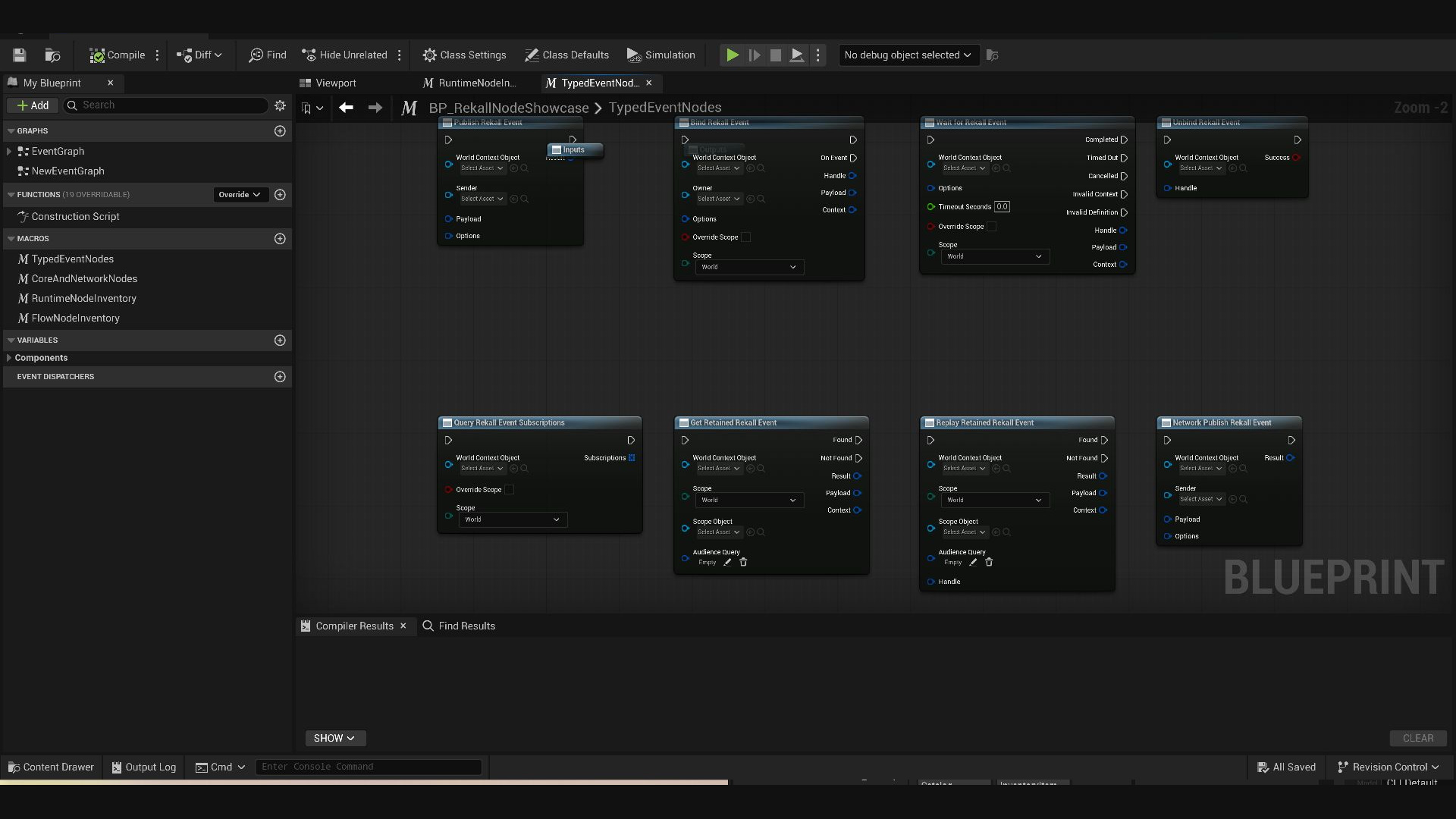
Select a Rekall Event Definition in Details or place a definition-specific action such as Publish Inventory Item Added. The concrete payload pin is reconstructed from that definition and the editor-only K2 node compiles away to a packaged Core or Network runtime call.
Figure 01
Definition-backed publish, subscription, wait, retained-state, query, and Network publication nodes with exact payload pins. Review the typed cards.
Typed · Core
Publish Rekall Event
Publishes the selected definition with its concrete payload struct.
Key inputs
World context, sender, typed payload, event options
A known event must cross Client/Server authority boundaries.
Watch for
No silent fallback occurs for wrong direction, missing endpoint, schema mismatch, or serialization failure; absence of a Network policy means local-only.
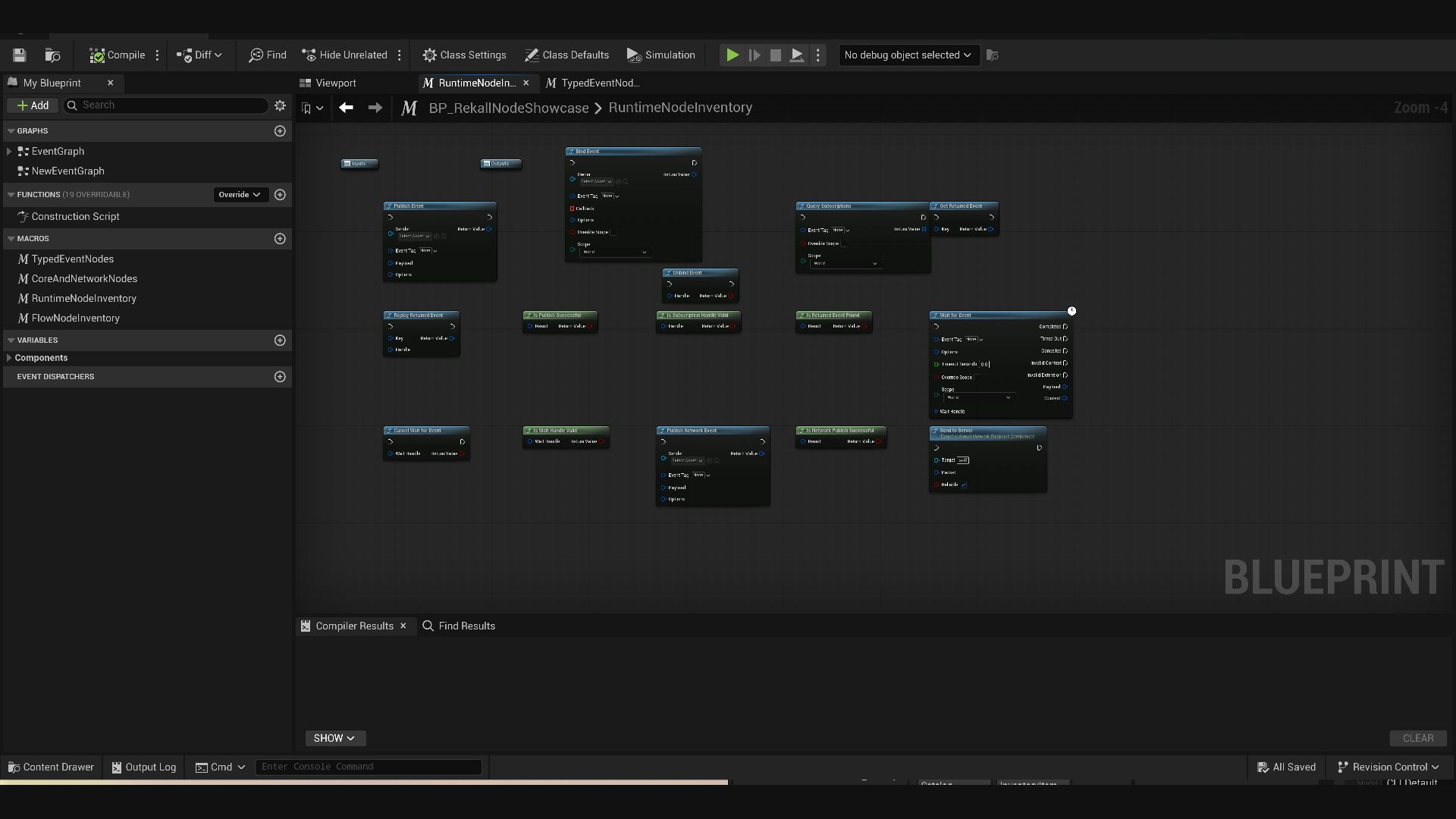
Use this data-driven surface when the event is selected at runtime. Payloads are owning FInstancedStruct values, but the registered definition's exact struct identity still governs every publish, retained read, replay, and transport operation.
Figure 02
Data-driven Core publication, subscription, retention and latent-wait helpers beside policy-controlled Network functions. Review the runtime cards.
Runtime · Core
Publish Event
Publishes a runtime-selected event through Core after exact definition and payload validation.
Key inputs
World context, sender, Gameplay Tag, FInstancedStruct payload, options
Outputs
Structured publish result
Use when
The event identity or payload value is selected from data at runtime.
Watch for
Calls are game-thread-only; matching fields do not substitute for exact struct identity.
Sends an already encoded Network packet through a PlayerController-owned endpoint's reliable or unreliable Server RPC.
Key inputs
Network packet, reliability flag
Outputs
No structured return; server admission is tracked by the endpoint
Use when
Low-level native/advanced tooling already has a validated encoded packet.
Watch for
Normal gameplay should prefer Publish Network Event. Attaching an endpoint to an arbitrary Actor is rejected; a packet never chooses its own trusted reflected type.
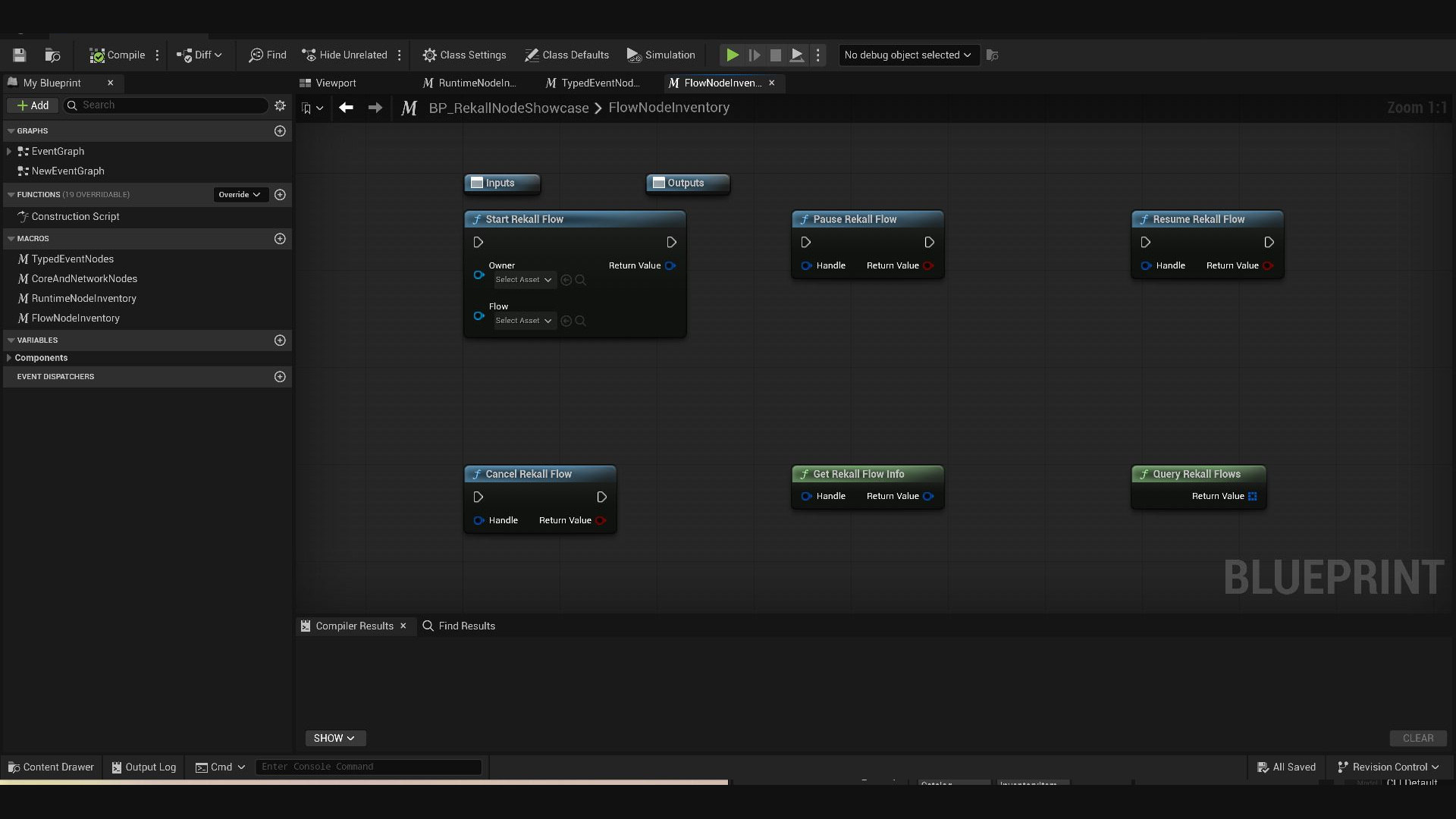
These convenience functions resolve the current World and control compiled Flow instances. They are distinct from the Publish, Wait Event, Delay, Branch, Repeat, Subflow, Parallel, Race, Gate, Action, Condition, Cancel, and End nodes authored inside a Rekall Flow Asset.
Figure 03
World-context Flow instance controls and inspection nodes. The screenshot's Inputs and Outputs tunnels are Unreal macro scaffolding. Review the Flow cards.
Flow · Lifecycle
Start Rekall Flow
Compiles/starts the supplied Flow Asset as a World-owned runtime instance.
Key inputs
World context, weak owner, Flow Asset
Outputs
Flow handle
Use when
A data-authored sequence should begin for a concrete owner.
Watch for
Authority mismatch, invalid asset, active-instance limit, or runtime-byte admission returns an invalid handle; Flow state is not implicitly replicated.
Start with the structured status, stable diagnostic code, registry errors, or Flow/Network instance record. Change configuration only after the failing stage is identified.
Definition-specific node is missing
Evidence first: run Validate Assets on the definition/catalog and confirm a valid tag and saved payload struct. Then save the definition, reopen the action menu, and check that the installed Editor module is enabled. The generic node can be placed and assigned in Details, but do not use it to hide an invalid definition.
Blueprint compilation or publish reports an invalid definition
Evidence first: inspect the compiler message, Result.Status/DiagnosticCode, IsRegistryReady(), and all GetRegistryInitializationErrors(). Then confirm the tag, payload contract, catalog assignment, duplicates, and policy fragments; restart PIE after changing a catalog because a Game Instance snapshots the registry at initialization.
Payload mismatch or a wire disconnected
Evidence first: look for PayloadMismatch or the typed-node compiler error and compare the live definition's exact struct. Then rebuild the value for the new schema, increment Schema Version, compile, test, and save. Do not substitute a layout-compatible, base, or derived struct.
Publish succeeds but no listeners run
Evidence first: inspect No Subscribers, attempted/delivered/skipped counts, then Query Subscriptions in the effective World or Game Instance router. Only then compare tag matching, owner lifetime, scope override, Local Player/Directed/Audience selector, captured audience tags, and delivery phase.
Wait never resumes
Evidence first: add a positive timeout and observe Completed, Timed Out, Cancelled, Invalid Context, or Invalid Definition. Query matching subscriptions and trace the publication correlation. Then align tag/query/scope/audience, confirm the callback target is alive, and check whether the same latent UUID replaced the wait. Zero timeout deliberately means unlimited.
Network publication is rejected
Evidence first: read Network Status, Route, Recipient Count, and Diagnostic Code, then correlate the Network record with Core. Check the live definition/policy, caller side, PlayerController-owned endpoint, schema signature/readiness, exact payload, byte/rate limits, authorization rule, and explicit owner/audience. Never broaden the route as a fallback.
Flow fails to start or terminates
Evidence first: validate the asset, inspect the returned handle, Get Rekall Flow Info, and query Flow trace records. An invalid start indicates context, asset, authority, instance, or byte admission failure. A live/terminal record exposes codes such as REK-FLOW-PUBLISH-FAILED, REK-FLOW-STEP-LIMIT, REK-FLOW-LIFETIME-LIMIT, or REK-FLOW-BYTE-LIMIT; fix that contract before raising a budget.
Works in Editor but not in a packaged build
Evidence first: inspect build/cook logs and packaged runtime receipts. Core plus intentionally used Network/Flow runtime modules may enter the build; RekallEventsEditor, RekallEventsInsights, BlueprintGraph, KismetCompiler, UnrealEd, tests, and QA modules must not. Typed nodes are compile-time conveniences whose generated bytecode calls Core or Network.
17
Reference
Packaging and module boundaries
The installed customer plugin contains exactly five customer modules. Unreal then excludes uncooked/editor diagnostics from packaged Game, Client, or Server runtime receipts.
Module
Installed customer plugin
Packaged runtime role
RekallEventsCore
Yes
Runtime event definitions, routing, scheduling, retention, and tracing producer
RekallEventsNetwork
Yes
Optional runtime transport when the project uses Network features
RekallEventsFlow
Yes
Optional runtime orchestration when the project uses Flow
RekallEventsEditor
Yes
UncookedOnly typed K2 nodes and asset validation; excluded from runtime receipts
RekallEventsInsights
Yes
Editor-only diagnostics; excluded from runtime receipts
Core has no dependency on Network, Flow, Insights, Slate, BlueprintGraph, KismetCompiler, or UnrealEd. Network and Flow depend one-way on Core. Typed nodes compile into runtime calls, so packaged bytecode does not require their K2 classes. Automation tests, QA tags, docs-test modules, BlueprintGraph, KismetCompiler, and UnrealEd are not customer runtime dependencies.
Legal Publisher: Rekall Software Solutions / Marius Myburg. Purchase tiers, current pricing, and Fab availability are stated on the product page; this guide does not expand those commercial boundaries.
18
Reference
Production checklist
Treat release readiness as a set of observable contracts. Record the asset, topology, build, and diagnostic evidence for each item instead of relying on a successful editor-only play session.
Validate definitions and catalogsContract
Run asset validation, resolve every catalog entry, reject duplicate tags, and confirm each definition names one exact reflected payload struct and intended policy metadata. Re-run after tag, schema, or catalog changes. Review definitions and payloads.
Prove listener cleanupLifetime
Store subscription and wait handles, exercise early unbind/cancel paths, destroy owners, and verify stale or foreign-router handles fail safely without keeping Worlds alive. Review publishing and listening.
Review scope, audience, and delivery timingDelivery
For each production event, document its effective router, eligible listeners, immediate or queued phase, and priority. Stress reentrant publishers and verify phase-sensitive reactions in the intended World and Local Player domains. Review routing and timing.
Lock Network policy and test every topologyAuthority
Allowlist only intended definitions and directions, then test Standalone, remote client, Listen Server host, and Dedicated Server behavior. Cover endpoint ownership, server authorization, exact schema, rate/byte limits, recipients, rejection evidence, and the late-join boundary. Review Network admission and routes.
Exclude editor-only modules from runtime receiptsBuild
Inspect staged receipts and dependency logs: RekallEventsEditor, RekallEventsInsights, BlueprintGraph, KismetCompiler, UnrealEd, tests, and QA modules must not enter customer runtime targets. Review module boundaries.
Smoke-test packaged Game, Client, and Server targetsRuntime
For every target the project claims to support, launch an actual packaged build and verify registry readiness, one typed and generic local publication, queued delivery, retained query/replay, intentionally used Network routes, and intentionally used Flow starts. Do not infer Client/Server support from Editor PIE. Review the qualified release boundary.
Review Insights payload and privacy policyEvidence
Confirm capture mode, sampling, payload opt-in, record/byte budgets, export handling, and who may inspect or share text snapshots. Verify metadata-only Network records and dropped-record diagnostics without making gameplay depend on the editor observer. Review capture and privacy gates.
19
Reference
Glossary
Short definitions for the terms used throughout the guide. Follow a term to the chapter that owns its full contract.
Audience is one of five local routing scopes. It selects subscribers whose captured Gameplay Tags satisfy the publication's audience query; an empty query or mixed Local Player or Directed selectors are rejected as InvalidScope.
Core retention is a bounded local cache: Latest replaces the value for one retention key, RecentHistory keeps a bounded ordered recent sequence, and LatestPerAudience keeps the latest value per exact Audience query. It is separate from Network's bounded ServerToAll late-join packet cache and is not authoritative replicated state.
For client-origin traffic, the client-origin endpoint receives the packet, then the server derives trusted identity and validates policy, schema, rate, bytes, and authorization before trusted Core republication. Outbound routes perform their checks before send.