The desktop studio
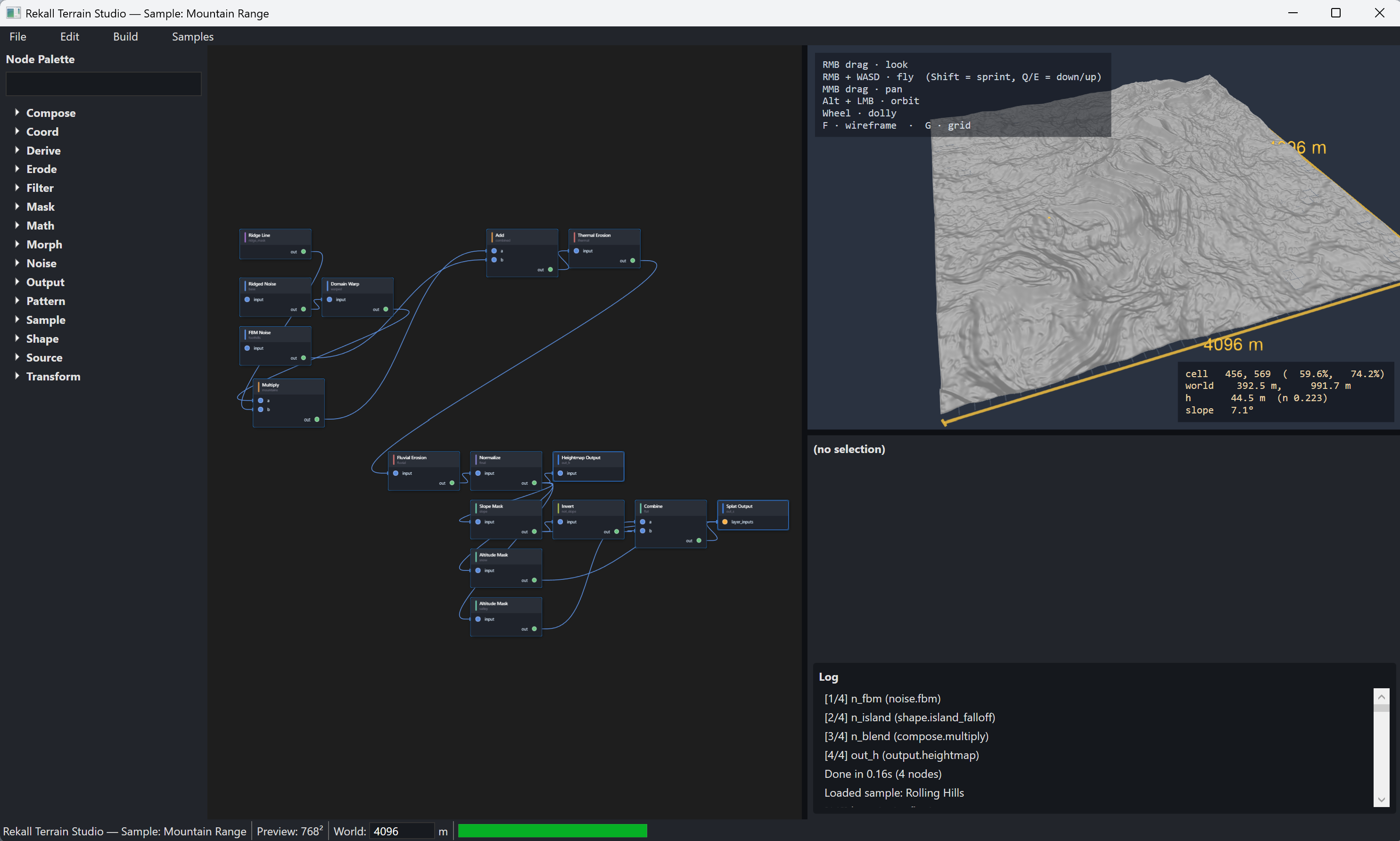
Rekall Terrain Studio
A standalone Windows WPF desktop application for procedural terrain design. Build terrain graphs visually, inspect results in a real-time 3D viewport, save native .terra projects, and generate general-purpose heightmaps, splat maps, previews, and portable graph exports.
The desktop studio
Why Rekall Terrain Studio
Terrain Studio is a standalone pro authoring surface for designing, testing, and packaging procedural terrain. It generates terrain data you can use in games, tools, renderers, simulations, or any workflow that accepts height and mask outputs.
Author terrain as a node graph with a searchable palette, pan/zoom canvas, filtered pin connection workflows, comments, groups, and portal-style wiring for large production graphs.
Preview heightmap meshes with orbit, top-down, sun-aligned, and isometric cameras. Toggle slope-tinted height shading, splat overlays, flow accumulation, sea level, and lighting.
The CPU evaluator handles every node kind in the current build. The GPU project and dispatch seam are isolated for future ComputeSharp acceleration, but CPU is the reliable production path today.
Save the full studio document as JSON: terrain graph, UI layout, groups, portals, comments, snapshots, viewport camera, build settings, and thumbnail history in one diffable file.
Generate heightmaps, grayscale previews, splat maps, and graph exports from the same source project. Use the outputs directly or pass them into whatever downstream terrain workflow you already use.
The companion rts command can build .terra files from scripts or CI, producing heightmap and splat outputs without launching the WPF application.
First run
Launch RekallTerrainStudio.exe, double-click noise.fbm in the palette, add output.heightmap, and wire the FBM output into the heightmap input.
Press F5 or use Build → Build Preview. The app evaluates the graph, updates the Helix viewport, and writes build artifacts under %TEMP%\RekallTerrainStudio\<timestamp>.
Use File → Save As to write a native .terra project, export graph JSON, or run the rts CLI to produce heightmap and splat outputs for downstream tools.
Workspace layout
The central canvas handles node placement, wires, pan/zoom, selection, deletion, output sinks, and palette-driven graph construction.
The viewport renders the active output as a terrain mesh. Sea and splat overlays are placeholders in the current v0.1 build, with the main height preview path already wired.
The palette groups all node families. The properties panel is generated from the node catalog, and the log surfaces build progress, warnings, validation issues, and evaluator errors.
Under the hood
Terrain Studio is independent at runtime. It is a normal desktop terrain generator with its own project format, evaluator, viewport, graph editor, and command-line build path.
Core owns the pure graph model, node catalog, validation, evaluator contracts, and topology. Schema owns import/export conversion between native .terra projects and portable graph JSON.
Eval.Cpu implements the complete evaluator. Eval.Gpu is present as the ComputeSharp acceleration boundary, with current builds relying on CPU for every node kind.
GraphEditor uses Nodify viewmodels. Viewport hides Helix Toolkit behind IViewport3D. The WPF shell composes the docks, file I/O, commands, and project workflow.
Use Terrain Studio when you want a dedicated Windows desktop workstation for graph-heavy procedural terrain design and repeatable map generation.