Rekall Terrain Graph

Node-graph terrain authoring,
native to Unreal Engine.

A standalone UE 5.7 plugin. Visual graph editor. Real-time preview. Deterministic C++ DAG evaluator. AW3D30 real-world terrain import, tiled World Partition-ready AW3D30 setup, picker-driven Landscape and path fields, preview water, graph-driven WaterBody or fallback spline creation, parameter presets, workflow automation, and direct Landscape application — without leaving the editor. Uses Unreal Engine's built-in ProceduralMeshComponent plugin for the in-editor 3D preview.

Get on FAB → See what it does
82
Node Types
17
Built-in Presets
UE 5.7
Supported
C++
Native Performance

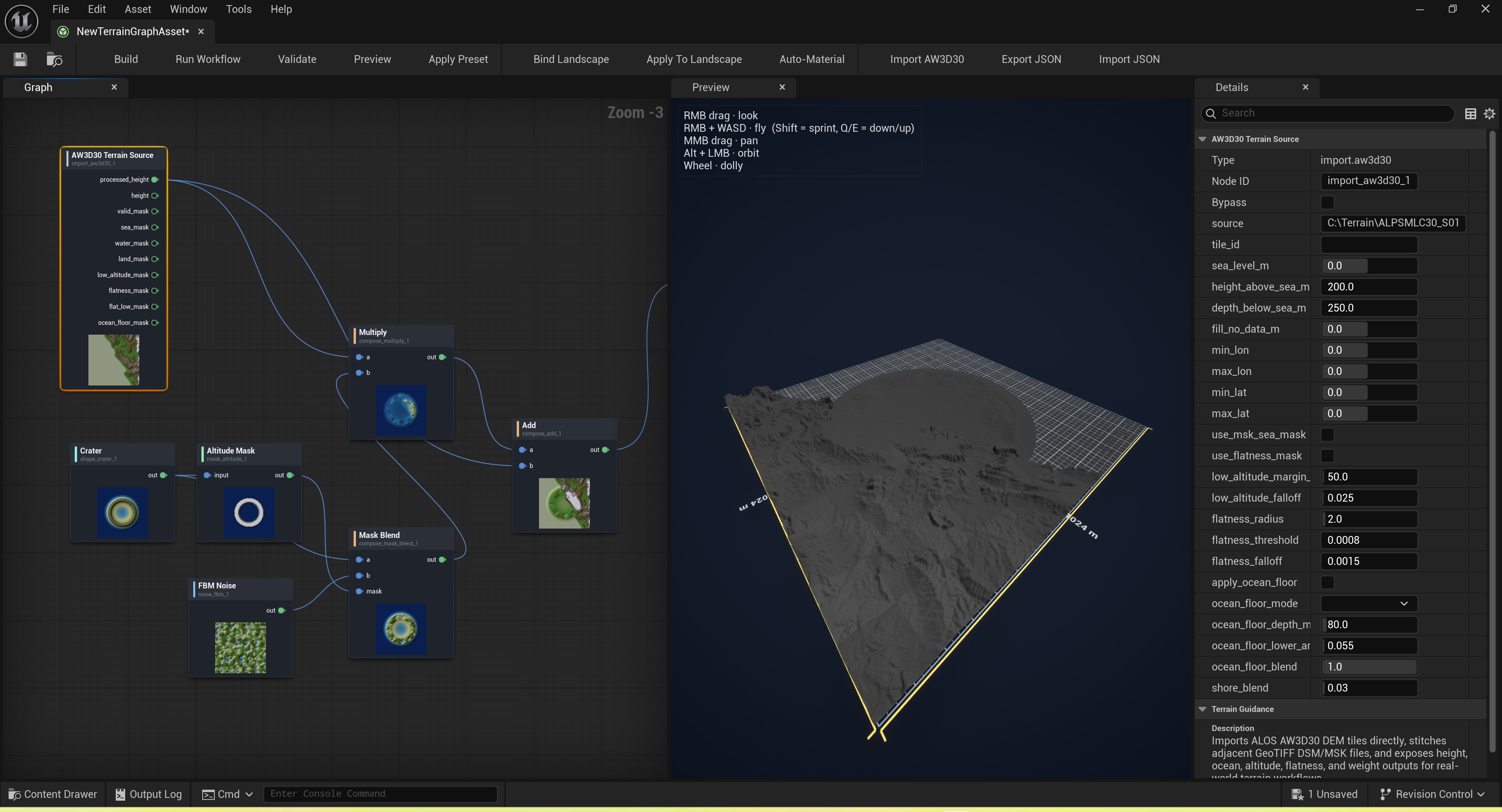
The graph editor

Rekall Terrain Graph graph editor — noise, erosion, and composition nodes wired into a complete terrain

Why Rekall Terrain Graph

A serious procedural terrain tool, in the editor.

Most terrain tools are either external apps you import from, or rigid editor presets. Rekall Terrain Graph is a first-class graph editor — same shape as the Material or Niagara editor — that drives a fast native evaluator.

01

Visual graph editor

Author terrain as a DAG of typed nodes — noise sources, shapes, masks, filters, erosion, composition, outputs. Drag, wire, preview. Lives in a dedicated asset editor with a preview tab and a per-node thumbnail strip.

02

Real-time preview

A debounced async evaluator runs your graph off-thread as you edit and pushes the result to a live preview texture. The selected node's heightmap shows alongside the graph's final output — no rebuild, no wait.

03

Deterministic by design

Same graph + same seed = byte-identical heightmap, every time. Great for source control, regression tests, and team collaboration. Round-trip JSON serialization preserves layouts, node parameters, and pin connections.

04

Direct Landscape application

Bind a graph to a Landscape actor, validate it, then apply height data directly with undo support. Run Workflow can build outputs, refresh the auto-material, and apply to the bound Landscape as one saved production recipe.

05

82 built-in node types

Noise, shapes, coordinate fields, procedural patterns, sampling transforms, math nodes, masks, filters, erosion, AW3D30 importers, multi-output analysis nodes, false-color split masks, and compositional ops.

06

17 shipped presets

From islands, canyons, dunes, and river valleys to atolls, badlands, mesas, glaciers, salt flats, cliffs, and wetlands. Click New Preset to create one with high-level controls for size, relief, water level, erosion, roughness, and output paths.

07

Water from graph data

After applying terrain, click Create Water to extract rivers and lakes from fluvial flow, AW3D30 water masks, sea masks, or GeoTIFF masks. Choose Water plugin actors, fallback spline actors, or automatic Water-first fallback output.
How it works

Graph in. Landscape out.

Step 1

Create a Terrain Graph asset

Right-click in the Content Browser → Terrain Graph. Open it in the dedicated asset editor. Start from a blank canvas, or load one of the shipped presets.

Step 2

Wire your DAG

Drop nodes from the palette, wire pins by category (Heightmap, Mask, Color), and tweak parameters in the Details panel. Landscape fields use dropdowns, source fields offer file/folder browse buttons, and Unreal asset outputs can use a Content Browser path picker. The preview updates as you edit. The schema rejects category mismatches and cycles before they hit the evaluator.

Step 3

Apply to a Landscape

From the asset editor toolbar, bind the graph to any Landscape in your level. The plugin generates the G16 heightmap, RGBA8 splat textures, optional auto-material, and saved workflow actions — all on the game thread where Unreal requires it.

Under the hood

Built like a first-party UE module.

A

Two cleanly-separated modules

RekallTerrainCore is the native terrain DAG evaluator and node registry. RekallTerrainGraphEditor is the UE EdGraph-backed asset editor, schema, and preview controller. Add either module's headers as a dependency and use them from your own C++.

B

Game-thread safe

Output ops that touch UObjects (Landscape application, texture creation, asset save) are explicitly game-thread. Pure-math nodes run off-thread for preview. Same discipline that keeps Rekall UE crash-free.

C

Round-trippable JSON

Every graph saves to and loads from JSON, including the full visual layout (node positions, comments, pin defaults). Diff your terrain in version control like you'd diff source code.

D

Real-world terrain import

Import JAXA ALOS AW3D30 DSM/MSK GeoTIFF tiles directly into mask-aware terrain graphs, including height, validity, sea, water, land, flatness, ocean-floor, and splat outputs. For large regions, Import AW3D30 Tiles creates one graph asset per tile and can create/apply matching Landscape actors in a World Partition map.

Standalone Terrain Tools

Everything runs inside the Terrain Graph editor.

Terrain Graph does not require any other Rekall or agent-facing plugin. Start from built-in presets, import AW3D30 data, create tiled graph assets, place Landscapes, tune Landscape LODs, apply terrain, generate materials, preview water, and create water actors directly from the editor UI.

Read the guide →

No other plugin required

One complete editor product.

The Terrain Graph plugin ships its own complete terrain core and editor workflow. Users who only own Terrain Tools still get the preset wizard, tiled AW3D30 importer, Landscape setup, graph workflow, auto-material, Landscape settings, and water creation features.

Built-in ProceduralMeshComponent preview
Unreal Engine 5.7 (Editor, Win64)
Single-graph and tiled AW3D30 GeoTIFF import for real-world Landscapes
New Preset, Create Landscape, Landscape Settings, workflow, and parameter preset controls
Configurable Auto-Material and Create Water dialogs
Water plugin actors or fallback spline actors from graph data
Native Unreal editor integration
MIT-style asset-import policy

Change log

Terrain Graph release history.

Customer-facing changes for the standalone Rekall Terrain Graph plugin.

1.0.0.59 May 19, 2026

Released standalone Terrain Graph package for Unreal Engine 5.7.

  • Published the standalone Rekall Terrain Graph plugin package for Unreal Engine 5.7 with no AI or MCP runtime dependency.
  • Ships the native terrain DAG evaluator, dedicated graph editor, live ProceduralMeshComponent preview, graph validation, JSON import/export, and direct Landscape application workflow.
  • Includes 82 terrain node types and 17 built-in presets for islands, mountain ranges, canyons, archipelagos, alpine terrain, dunes, river valleys, and other starter terrains.
  • Supports single-graph and tiled AW3D30 GeoTIFF import, World Partition-friendly tile placement, picker-driven Landscape and path fields, and repeatable graph-to-Landscape application.
  • Adds terrain workflow controls for New Preset, Create Landscape, Landscape Settings, configurable Auto-Material output, preview water, and graph-driven WaterBody or fallback spline creation.
  • Improves Create Water output selection so preview outputs no longer block the only available height output, and ambiguous graphs prompt for the height output to sample.
  • Adds per-node thumbnail display toggles with visible false-color and grayscale swatch icons, with output-node thumbnails now inspecting their connected input buffers.
  • Adds derive.false_color_split with luma, low, mid, and high semantic mask outputs based on the same preview ramp.
  • Auto-contrasts preview PNGs so narrow high-range heightfields no longer appear as flat white thumbnails.
  • Refreshes node thumbnails automatically after graph edits, and makes false-color split pins isolate low, mid, and high terrain bands instead of leaking neutral white or grey into every channel.
1.0.0.48 May 18, 2026

Release candidate package and documentation pass.

  • Prepared the Fab submission package with packaged documentation, examples, review materials, and the standalone Terrain Graph product page.
  • Separated Terrain Graph documentation from Rekall UE MCP documentation so buyers can understand the plugin as its own Unreal editor terrain tool.
  • Documented AW3D30 import, parameter presets, workflow actions, preview water, Create Water, node reference, graph JSON, and Landscape authoring workflows.

Procedural terrain that lives in your editor.

One asset type. One graph editor. One Apply button. Heightmap, splat, material — done.