Rekall Fusion guide
Installation
Rekall Fusion is a Windows desktop application. It runs on Windows 10 (version 1809 or later) and Windows 11, 64-bit, and needs the .NET 10 desktop runtime. Copy the application folder anywhere you like and start RekallFusion.exe; there is nothing to register and no service to install. Settings are stored per user under %AppData%\Rekall\Fusion.
Your first stack
- Add the frames. Drag a folder onto the window, or use Add folder / Add files. Every supported image in the folder is loaded in natural order (
img2beforeimg10). Thumbnails appear within a second or two, even for raw files. - Check the order. Frames must be in focus order, front-to-back or back-to-front, which is what a rail or a camera's focus-bracketing mode produces. Use the reverse button if the sequence runs the other way; it does not matter which way, only that it is monotonic. Rekall Fusion also checks this for you during alignment and can re-sort the stack.
- Pick a mode and engine. Leave the mode on Different focus and Depth map selected unless the subject has crossing hairs, bristles or branches at different depths; then choose Pyramid or Hybrid.
- Choose where to save. Rekall Fusion proposes a
stackedfolder next to your frames with a 16-bit TIFF. Use Browse… to change the name, folder or format. - Press Stack. The footer shows the stage, progress and estimated time. The depth map appears as soon as it exists, the result when fusion finishes. A 24-frame 40-megapixel raw stack takes about two minutes.
- Inspect. Zoom with the mouse wheel, drag to pan, use 100 % to check actual pixels, then open the Statistics tab to see how well the stack was shot.
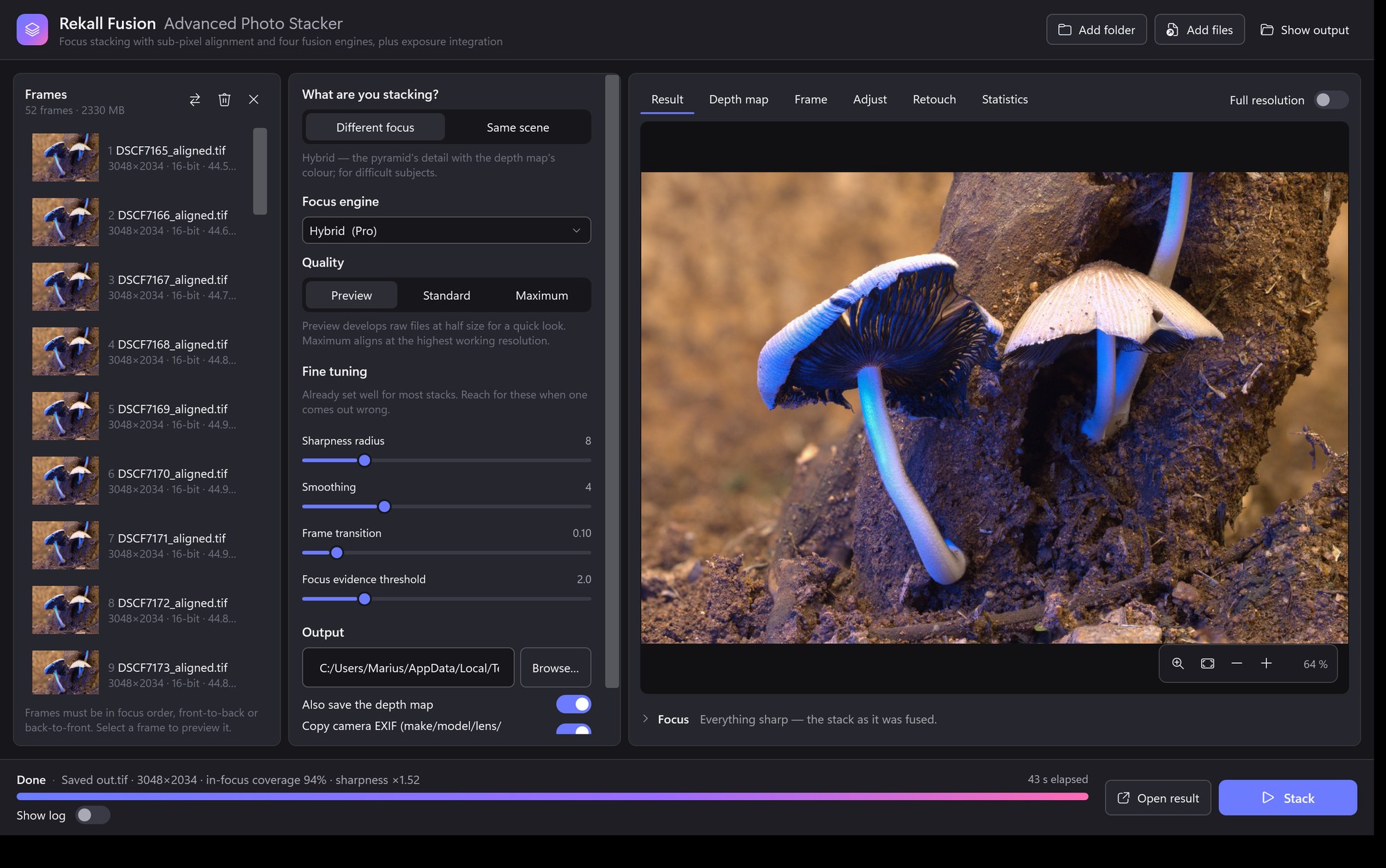
The interface
Frames (left)
The list of source frames in stack order, with thumbnails, file sizes and, for developed images, their dimensions and bit depth. Select a frame to preview it in the centre pane. The three icons above the list reverse the order, remove the selected frame and clear the list. Frames can be added by drag and drop at any time except while a stack is running.
Preview (centre)
Four tabs: Result (the fused image), Depth map (colourised, with a near-to-far legend), Frame (the selected source frame) and Statistics. Every image view zooms with the mouse wheel around the cursor, pans by dragging, and has Fit, 100 %, plus and minus buttons in the corner. The Full resolution switch replaces the fast 2400-pixel preview with the full-size image so you can inspect actual pixels of a large result.
Settings (right)
The mode selector, the engine cards, the quality preset, the output path and a switch to save the depth map next to the result. Advanced settings opens every engine parameter; hover any label for an explanation. Reset to defaults at the bottom restores the measured defaults.
Footer
Stage, status, progress bar, elapsed and estimated remaining time, the Stack and Cancel buttons, Open result once a run has finished, and a Show log switch that reveals the engine's log lines, including per-pair alignment details. Errors appear as a red banner above the progress bar.
Choosing an engine
| Engine | Use it for | Character |
|---|---|---|
| Depth map | Most subjects: surfaces, objects, landscapes, most macro. Anything with a continuous depth. | Cleanest edges and colours. Finds the sharpest frame per pixel, builds a confidence-weighted depth map, propagates it into textureless areas without crossing edges, and takes each pixel from the frame nearest its depth. Produces the depth map. |
| Pyramid | Crossing hairs, bristles, branches at different depths, insect legs over a background, very deep stacks. | Selects the strongest detail at every scale of a Laplacian pyramid. By default a depth estimate steers the selection (depth guidance window 2) so noise is not picked from distant frames. On our reference stack it measured the highest in-focus coverage of any engine, with slightly more contrast than the depth map. |
| Hybrid | Difficult subjects where the pyramid's detail is wanted but its colour and contrast shifts are not. | Runs both engines and takes the luminance from the pyramid and the colour from the depth map. This is the combination experienced stackers assemble by hand in an editor; here it is one pass. |
| Weighted average | Short stacks, simple surfaces, subjects with glare or specular highlights. | Sharpness-weighted blend of the frames. Smooth and halo-free where there is texture; backgrounds that are never in focus come out mottled on long stacks. |
Integration mode
Focus stacking and integration answer different questions, so Rekall Fusion keeps them apart. Set the mode to Same scene when your frames are all focused on the same plane and you want to combine repeated samples of each pixel rather than choose between them. Noise falls with the square root of the number of frames, and anything present in only a few frames can be rejected.
This is not only an astrophotography technique, although that is where the vocabulary comes from. It is the same operation behind:
- Noise reduction on a static subject — a burst of a night landscape, an interior or a product shot, averaged down.
- Removing people and traffic — a series of a monument or a street, where the median discards anything that moves.
- Long-exposure smoothing — averaging many frames to soften water or cloud without a neutral-density filter.
- Sensor defects — hot pixels, dust motes, cosmic-ray hits and satellite trails that appear in only one or two frames.
- Cleaner focus stacks — shoot several frames at each focus position, integrate each position, then focus stack the cleaned results. Common in high-magnification macro where noise, not depth, is the limit.
| Rule | Use it for | How it behaves |
|---|---|---|
| Sigma clip | Occasional outliers: hot pixels, dust, satellite trails, one passer-by. | Computes the average and standard deviation of each pixel, rejects samples farther than kappa deviations from it, then recomputes and repeats. Each iteration tightens the estimate now that the outliers no longer inflate it. |
| Median | Heavy contamination: crowds, traffic, anything present in a large share of the frames. | Takes the middle sample per pixel. Robust with no tuning at all, at the cost of slightly more noise than the mean. |
| Mean | Clean frames where nothing needs rejecting. | Plain average. The best signal-to-noise of the three, and the most easily spoiled by a single bad frame. |
Quality presets
- Preview
- Develops raw files at half size and aligns at 1600 px with cubic interpolation. Roughly four times faster; ideal for checking order, framing and engine before the real run.
- Standard
- Full-size development, Lanczos interpolation, automatic alignment resolution (a third of the image, between 1600 and 3000 px). The recommended setting.
- Maximum
- Aligns at 3000 px working resolution for the last fraction of a pixel. Slower alignment; use it for very high-resolution sensors or when you will print large.
Presets only change the raw size, interpolation and alignment resolution. All other settings stay as you set them.
Deep stacks and slabbing
Beyond roughly fifty frames, fusing everything in one pass gets harder: every pixel has more candidates, so wrong choices become more likely, and retouching means reaching back into hundreds of source frames. Slabbing solves both. Set Slab size to, say, 10 with an overlap of 2, and Rekall Fusion fuses overlapping groups of ten frames into intermediate images first, then fuses those intermediates into the final result.
- Cleaner deep stacks. Each fusion sees a narrower depth range, so the selection has less opportunity to go wrong.
- Practical retouching. Turn on Save the intermediate slabs and you retouch from twenty slabs rather than two hundred frames.
- Faster experiments. Once slabs exist you can re-fuse them with different settings in a fraction of the time.
The depth map is mapped back from slab units to frame units, so it still reads in terms of your original frames. The overlap keeps detail from falling between slabs; two frames is enough in most cases.
Retouching with masks
No automatic stacker is perfect on every pixel of a difficult subject. Turn on Save per-frame contribution masks and Rekall Fusion writes, for every frame, an 8-bit mask of where that frame ended up in the result. With Save the aligned frames on as well, you have everything needed for non-destructive retouching in Photoshop, Affinity Photo or GIMP:
- Open the fused result, then place the aligned frames you want to correct from as layers above it. They share the same geometry and crop, so they land in register.
- Add the matching contribution mask as a layer mask, or paint your own where you disagree with the engine.
- Nothing is destructive; the fused image underneath stays intact, and you can toggle any correction on and off.
The same trick works between engines: stack once with the depth map and once with the pyramid, then paint the pyramid result over the areas where crossing detail matters. The Hybrid engine automates the common case of that combination.
Previews and the depth map
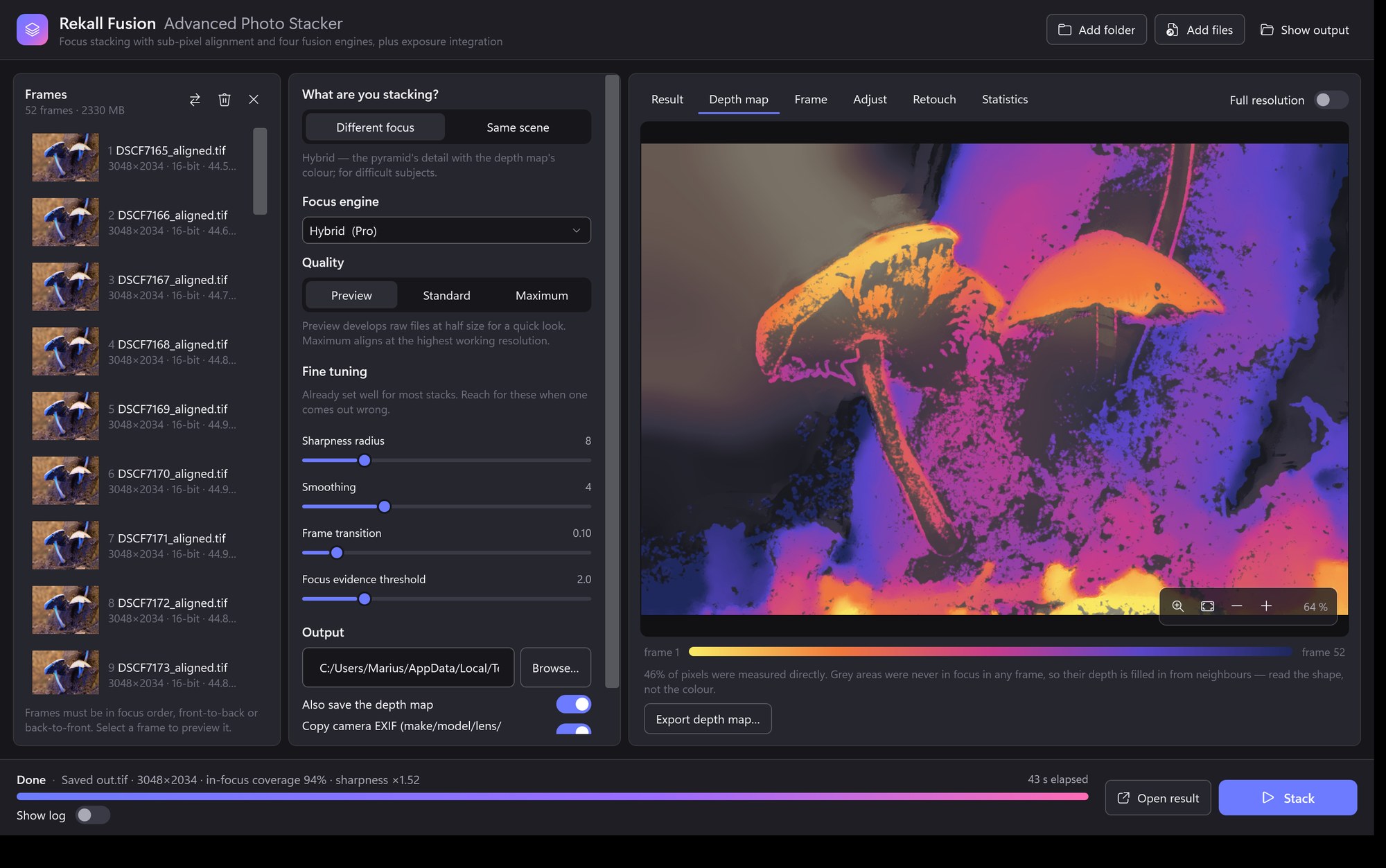
The depth map shows, for every pixel, which frame (and fraction of a frame) the result was taken from. It is the quickest way to judge a stack: a smooth map with clean edges around the subject means the engine understood the scene; speckle or blotches over a textured area mean it lacked focus evidence there. Areas that are never in focus in any frame, such as a distant background, inherit the depth of the nearest confident neighbour, which keeps the background from the least blurred frame.
With Also save the depth map on, a 16-bit PNG named after the output (…_depth.png) is written next to the result. Black is the first frame, white the last.
Settings reference
Values in the default column are the ones that measured best on real stacks; the in-focus coverage statistic was the yardstick.
Sharpness and selection
| Setting | Default | What it does |
|---|---|---|
| Sharpness radius | 8 px | Size of the neighbourhood used to judge sharpness. Small values (3–5) keep thin detail but produce more noise and halos at edges; larger values reduce halos at the cost of fine detail. Increase it until halos go, then stop. |
| Smoothing | 4 | How strongly the selection is smoothed. Depth map: the propagation radius of the depth map (smoothing × radius ÷ 2 pixels). Pyramid: the size of the median filter over the selection maps. Average: lower is more selective. |
| Pyramid / blend levels | auto | Number of levels in the multi-band blend or the pyramid. Automatic chooses from the image size (five for the depth-map blend). |
Depth-map engine
| Setting | Default | What it does |
|---|---|---|
| Frame transition | 0.10 | Width of the cross-fade between two consecutive frames, in frames. 0 picks the nearest frame outright (crispest); 1 blends linearly across the whole interval. Nearest-frame selection measured about 3 dB better than a linear cross-fade on ground-truth tests. |
| Plateau averaging | 0 (off) | Extra blend width where the neighbouring frames are practically as sharp as the best one, averaging them to reduce noise. Off because residual misalignment on real stacks costs a little detail; try 1 on very noisy stacks. |
| Focus evidence threshold | 2.0 | The sharpest-to-blurriest ratio at which a pixel starts to count as measured depth; full confidence at three times this value. Pure noise gives a ratio near 1. Lower it for very smooth subjects, raise it for very noisy ones. |
| Edge sensitivity (eps) | 0.001 | Regularisation of the edge-aware filter that propagates depth. Smaller values follow fainter edges; larger values smooth across them. |
Pyramid engine
| Setting | Default | What it does |
|---|---|---|
| Depth guidance window | 2 | A depth map is estimated first and pyramid selections farther than this many frames from it are penalised, which stops noise being picked from distant frames. 0 gives the classic unconstrained pyramid, the choice for stacks whose frames are not in a clean sequence. |
| Grit suppression levels | 0 (off) | This many finest pyramid levels average every frame that is practically as sharp as the winner, instead of copying the winner alone. It suppresses the noise pyramid methods amplify, but on our reference stack it cost in-focus coverage (87 % to 59 %). Use it only when noise is visibly the problem. |
Integration
| Setting | Default | What it does |
|---|---|---|
| Combination rule | Sigma clip | Sigma clip, median or mean. See Integration mode for which to choose. |
| Rejection sigma | 2.5 | Samples farther than this many standard deviations from the per-pixel average are rejected. Typical values run from 2 to 5: lower rejects more aggressively but discards more signal. |
| Rejection iterations | 3 | How many times the average and deviation are recomputed after rejection. One pass removes gross outliers; further passes tighten the estimate now that those outliers no longer inflate it. |
Deep stacks
| Setting | Default | What it does |
|---|---|---|
| Slab size | 0 (off) | Fuse overlapping groups of this many frames first, then fuse the slabs. Try 10–15 for stacks beyond about fifty frames. |
| Slab overlap | 2 | Frames shared by consecutive slabs, so no detail falls between them. |
| Save intermediate slabs | off | Writes each slab as a 16-bit TIFF next to the output, for retouching or re-fusing. |
| Save contribution masks | off | Writes, per frame, the mask of where that frame ended up in the result. |
Alignment
| Setting | Default | What it does |
|---|---|---|
| Align frames | on | Turn off only for frames that are already registered, for example from a telecentric lens on a rail or frames exported by another aligner. All frames must then have the same size. |
| Motion model | Similarity | Similarity handles shift, rotation and the magnification change of focus breathing. Affine adds shear; Homography adds perspective for hand-held stacks with a lot of movement; Translation is for rails that only shift. |
| Working resolution | auto | Long side, in pixels, at which frame pairs are registered. Automatic uses a third of the image between 1600 and 3000, chosen so the refinement's precision lands around 0.15 px at full resolution. |
| Match brightness | on | Measures a per-channel gain between neighbouring frames and equalises exposure through the stack. |
| Crop to common area | on | Crops the output to the area covered by every frame. Off keeps the full reference frame. |
| Interpolation | Lanczos | Resampling filter used when frames are warped. Lanczos is sharpest; Cubic is a little faster. |
| Fix the frame order | off | If the magnification measured during alignment says the frames are not in focus order, re-sort them by magnification before fusing. Focus stacking needs a monotonic sequence. |
Raw files
| Setting | Default | What it does |
|---|---|---|
| Develop at half size | off | Four times faster development at half resolution. The Preview preset turns this on. |
| Use each file's own white balance | off | By default the first frame's camera white balance is applied to every frame so colours do not drift through the stack. Turn on only when the frames were deliberately balanced individually. |
| Exposure | 0 stops | Exposure shift applied during development, from −3 to +3 stops. Highlights are clipped, never recovered, so expose to the right in camera. |
Output and system
| Setting | Default | What it does |
|---|---|---|
| Bit depth | follow source | 16 bits for raw and 16-bit inputs, 8 bits for JPEG inputs. JPEG output is always 8-bit. |
| Save aligned frames | off | Writes every aligned, cropped frame as a 16-bit TIFF into a folder next to the output. Useful for retouching or re-fusing without aligning again. |
| Frame cache | Auto | Where aligned frames are kept during a run. Auto uses memory when the stack fits in half of the RAM, else a temporary folder on disk. |
| Worker threads | all | Limit the number of cores used, for example to keep the machine responsive during long runs. |
Understanding the statistics
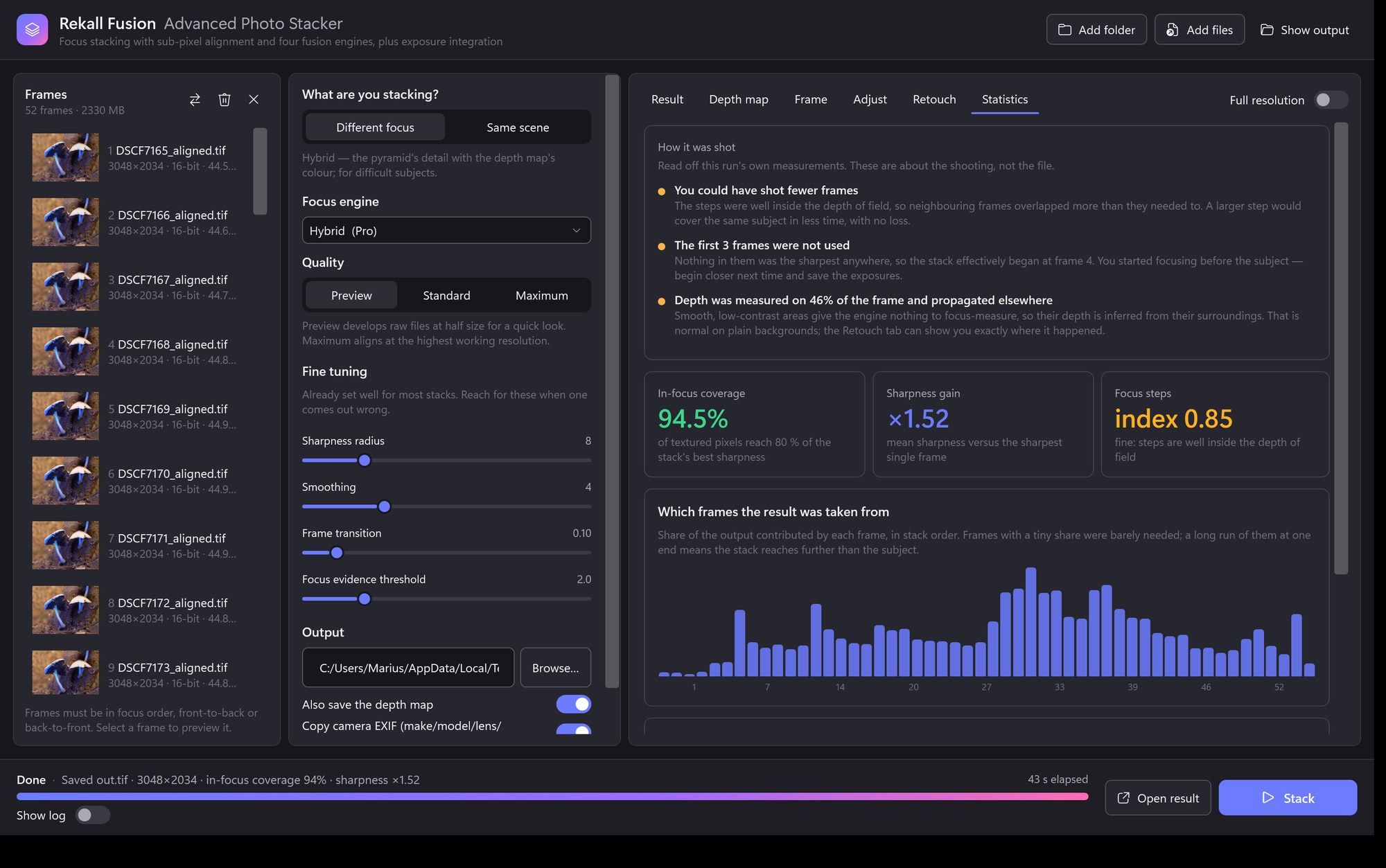
- In-focus coverage
- The share of textured pixels whose sharpness in the result reaches 80 % of the best any frame achieved at that spot. This is the number Rekall Fusion is tuned to maximise. Values in the 70–90 % range are typical for a good stack; lower values usually mean the stack does not reach part of the subject or the frames are misaligned.
- Sharpness gain
- Mean sharpness of the result divided by that of the sharpest single input frame.
- Focus steps
- Measured from the focus profile of every confident pixel. Coarse means detail between frames is being lost and you should shoot smaller steps; adequate means the steps roughly match the depth of field at pixel level; fine means the steps sit well inside it and fewer frames would do.
- Frame shares
- How much of the output came from each frame, in stack order. A long run of near-zero bars at one end means the stack reaches beyond the subject in that direction; tall bars at the very end mean the subject continues past the last frame.
- Focus order
- Whether the magnification measured during alignment runs monotonically through the stack. Out-of-order frames degrade depth-map fusion badly, so this is worth reading before anything else.
- Depth measured directly
- The share of pixels whose depth was determined from focus evidence rather than propagated from neighbours. Smooth subjects and out-of-focus backgrounds lower this without harming the result.
- Crop loss
- The share of the frame area removed so that every pixel of the output is covered by all frames. Hand-held stacks lose more; a rail loses almost nothing.
- Alignment table
- For every adjacent pair: the registration method, the number of matched features, whether the sub-pixel refinement was accepted, the correlation after alignment, and the recovered shift, rotation and scale. A rejected refinement or an unusually low correlation points at a frame that moved.
Shooting good stacks
- Keep the frames in order. Focus bracketing in camera, a rail, or turning the focus ring in one direction all work. Do not mix directions or repeat frames.
- Overlap the depth of field. Consecutive frames should share some sharp area. The Focus steps verdict tells you whether you managed it.
- Cover the whole subject, and a little more. Start slightly in front of the nearest point and finish slightly behind the farthest.
- Fix the exposure and white balance. Manual exposure avoids brightness changes between frames; Rekall Fusion equalises small drifts but not clipped highlights.
- Hand-held is fine, but be steady. Similarity alignment absorbs the usual shift, rotation and focus breathing. Use the Homography model if you moved the camera noticeably.
- Prefer raw. Raw frames are developed with one white balance at 16 bits, which gives the engine the cleanest signal.
Troubleshooting
| Symptom | Likely cause | What to try |
|---|---|---|
| Halo around an edge | Blurred foreground spilling over the in-focus background in the frames where the background is sharp. | Increase the sharpness radius step by step until the halo shrinks; try slabbing, which limits how far the blur can reach; a smaller aperture reduces the spill at source. |
| Soft patch on a textured surface | The depth map chose the wrong frame because focus evidence was weak. | Look at the depth map. Lower the focus evidence threshold, raise smoothing, or try the pyramid. On very noisy images set plateau averaging to 1. |
| Thin structures disappear where they cross | A single depth per pixel cannot describe crossing structures. | Use the pyramid or hybrid engine; reduce smoothing; a smaller radius keeps thinner detail. |
| Double edges, ghosting | Misalignment between neighbouring frames. | Check the alignment table for a pair with low correlation. Try the Homography model, a higher working resolution, or the Maximum preset. Remove a frame that moved. |
| Result is a blurry average | Frames are out of order or the sequence is repeated. | Read the focus-order verdict in the statistics and turn on Fix the frame order automatically, or sort the files yourself. |
| Noisy, gritty fine detail | The pyramid engine amplifying sensor noise at the finest scale. | Turn grit suppression up to 1, or switch to the depth map or hybrid engine. |
| Colours shift across the stack | Per-frame white balance or exposure changes. | Keep the default single white balance; keep match brightness on; shoot with manual exposure. |
| Large black or missing borders | Hand-held movement reduced the common area. | Expected: the output is cropped to the area every frame covers. Turn crop off to keep the full reference frame. |
| Run is slow or the machine swaps | Very large stack kept in memory. | Set the frame cache to Disk, reduce worker threads, or use the Preview preset first. |
Command line
The same engine is available as the fusionstack command for scripting and batch work. Inputs can be files, folders or glob patterns; frames are sorted naturally.
fusionstack stack C:\Stacks\lichen -o C:\Stacks\lichen\stacked.tif --depth-map C:\Stacks\lichen\depth.pngfusionstack stack C:\Stacks\beetle -o beetle.tif -m hybrid --slab-size 12 --save-slabs C:\Stacks\beetle\slabsfusionstack stack C:\Stacks\plaza -o plaza.tif --mode integrate --integration medianfusionstack align C:\Stacks\lichen -o C:\Stacks\lichen\aligned| Option | Default | Meaning |
|---|---|---|
-o, --output | required | Output image for stack; output folder for align. |
--mode | focusstack | focusstack or integrate. |
-m, --method | depth | Focus engine: depth, pyramid, hybrid or average. |
--integration | sigmaclip | Integrate mode: sigmaclip, median or mean. |
-r, --radius | 8 | Sharpness radius in pixels. |
-s, --smoothing | 4 | Selection / depth-map smoothing. |
--transition | 0.1 | Depth engine: cross-fade width between consecutive frames. |
--plateau | 0 | Depth engine: plateau averaging width. |
--confidence | 2 | Depth engine: focus evidence threshold ratio. |
--edge-eps | 0.001 | Depth engine: propagation edge sensitivity. |
--pyramid-window | 2 | Pyramid engine: depth guidance window in frames; 0 = classic. |
--pyramid-grit | 0 | Pyramid engine: grit suppression levels. |
--kappa | 2.5 | Sigma clipping: rejection threshold in standard deviations. |
--clip-iterations | 3 | Sigma clipping: rejection passes. |
--slab-size, --slab-overlap | 0, 2 | Slabbing: frames per slab and their overlap. |
--save-slabs, --save-masks | — | Directories for the intermediate slabs and per-frame contribution masks. |
--sort-by-scale | off | Re-order frames by measured magnification when they are not in focus order. |
--transform | similarity | similarity, affine, homography or translation. |
--align-size | auto | Alignment working resolution (long side in pixels). |
--no-align, --no-brightness, --no-crop | — | Skip alignment, exposure matching or cropping. |
--interp | lanczos | lanczos or cubic. |
--depth-map | — | Also write the 16-bit depth map. |
--bit-depth | source | 8 or 16. |
--save-aligned | — | Folder for the aligned frames as 16-bit TIFF. |
--raw-half, --raw-exposure, --raw-per-file-wb | — | Raw development options. |
--cache, --threads | auto, all | Memory policy and parallelism. |
-v, --verbose | — | Per-pair alignment details and the full alignment table in the summary. |
Exit codes: 0 success, 1 usage error, 2 processing error with a message on standard error. The summary printed at the end contains the same statistics as the application.
Frequently asked questions
Does the direction of the stack matter?
No. Front-to-back and back-to-front both work; only a monotonic order matters. The depth map legend labels frame 1 as the near end simply because that is the common convention.
Can I stack JPEGs?
Yes. Output then defaults to 8 bits. Raw or 16-bit TIFF gives the engine more to work with and is recommended when available.
Why is part of the result still soft?
Most often because no frame is sharp there: the stack stopped short of the nearest or farthest point, or the depth of field between two frames did not overlap. The frame-shares chart and the focus-step verdict show which it is.
How many frames can I stack?
There is no fixed limit. Frames are streamed one at a time, so memory grows with image size, not with the number of frames. For very deep stacks turn on slabbing.
Can I use Rekall Fusion for astrophotography?
Integration mode does the last step of one: it averages frames of the same scene and rejects outliers such as satellite trails and hot pixels. What it does not do is the rest of a deep-sky workflow — calibration with dark, flat and bias frames, star-field registration with field rotation, drizzle, or gradient removal. For nightscape bursts and noise reduction it is genuinely useful; for deep-sky work a dedicated tool is the right choice.
Is the depth map usable elsewhere?
It is a plain 16-bit PNG in which the value maps linearly from the first frame (black) to the last (white). It can be used as a mask, for depth-based effects, or simply to judge the stack.